


Woodber - Classic Number Game
4.95.97K Reviews
App Specs
- Version
- 2.19.1
- Updated On
- License
- Free
- Downloads
- 10,000,000+
- Developer
- LIHUHU PTE. LTD.
- Categories
- Board
- Platform
- Android, iOS
Screenshots
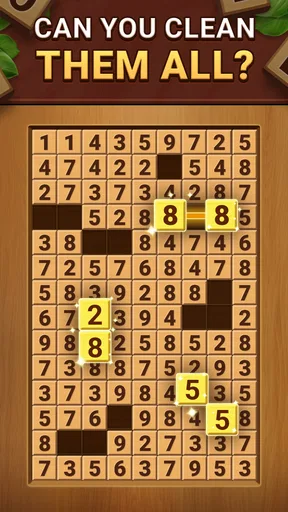
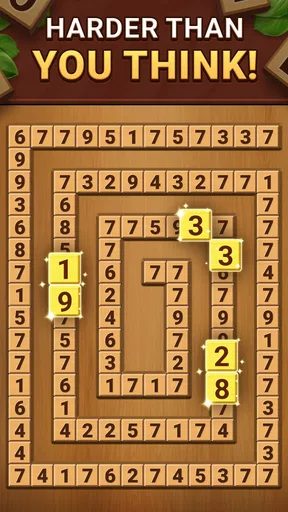
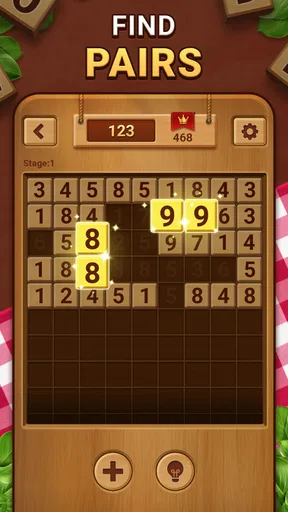
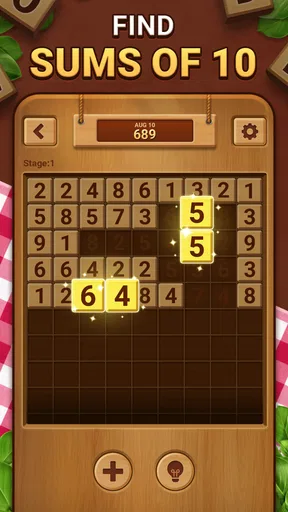
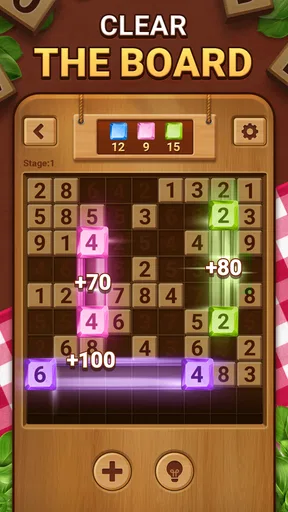



 Analysis by AppCompare
I usually judge a number puzzle by how quickly I can understand what it wants from me, whether a short session feels worthwhile, and whether the challenge comes from reasoning rather than guesswork. Woodber - Classic Number Game suits that kind of player: it is a board game built around number matching and cross-math, with a familiar puzzle feel rather than the pace of an action game. I found it easiest to enjoy when I treated each round as a small concentration break, not as something I needed to rush through.
That distinction matters when choosing between number games. Sudoku asks you to reason across rows, columns, and regions; a match-style number puzzle has a different rhythm, encouraging you to scan the board and consider which choices will leave useful options. Woodber brings number logic together with a woody block-puzzle presentation, so it can appeal to people who like moving between calculation and spatial planning. If you want a calm puzzle that gives you something to think about without demanding a long uninterrupted session, that mix is its strongest case.
Getting Started with Woodber
First things first, downloading Woodber - Classic Number Game is a breeze. Available on both Android and iOS, I just hopped onto the app store, searched for it, and boom—it was ready to go. As soon as I launched it, the interface caught my eye. It's got this really clean wooden aesthetic that’s easy on the eyes, almost like holding a polished wooden puzzle board.
LIHUHU PTE. LTD. developed the game, which is free to download and intended for everyone. Its average rating is 4.9 from around 328,000 ratings, and it has attracted over 10 million installs. Those figures suggest that the straightforward puzzle format has broad appeal, though popularity alone won’t tell you whether its particular blend of number and board play is your kind of challenge. The current version is 2.9.7, and it requires Android 7.0 or later on that platform.
Gameplay: A Classic with a Twist
Now, let's talk gameplay. If you’re familiar with number games like Sudoku, you’ll feel right at home. The objective is straightforward: arrange numbers on a grid in a way that satisfies the game’s rules. But here's the kicker—Woodber introduces some nifty twists and challenges that keep things fresh. I found myself scratching my head more than once, but in the best way possible.
One thing I appreciated is the progressive difficulty. It starts off easy, letting you get into the groove, but quickly ramps up the challenge. The app is perfect for both quick sessions when you have a few minutes to spare and longer, more intense puzzle-solving marathons.
For a useful everyday routine, I’d use a short round during a commute while seated, waiting for an appointment, or taking a break between tasks. It gives idle minutes a clear focus without requiring the setup or sustained attention of a lengthy strategy game. If I had only a moment, I’d aim to make a few deliberate moves and stop at a natural pause rather than start a round when I knew I would need to put the phone away immediately.
Worth Reading Before You Choose

Baby Panda World Brings Quick Play to Modern Phones, but Its Game Library Feels Busy

ESPN’s Live Game View Makes Following Close Games Easier

QuizzLand Review: A Good Fit for Short Trivia Breaks, Not Every Player

Basketball Stars: Multiplayer Is Fast, but Can It Recover When Matches Go Wrong?

WEBTOON Turns Phone Updates Into a Better Reading Routine

Link to Windows Runs on Shared Habits, Not Social Feeds
My practical tip is to scan the whole board before committing to a move. In number-and-block puzzles, a choice that looks locally convenient can narrow the options available elsewhere, so looking for constrained spaces first is often more useful than tapping the first available match. When I got stuck, I treated the hint as a way to understand the current bottleneck, then tried to apply that reasoning to the next decision myself. That makes assistance more instructive than simply using it to rush through.
Features That Stand Out
What makes Woodber stand out are the little touches. The app tracks your progress and scores, so you can always try to beat your previous best. There’s also a handy hint system if you ever find yourself stuck, which I found myself using a bit more than I’d like to admit!
The sound design deserves a shoutout too. Subtle clicks and calming music in the background create a soothing atmosphere that’s perfect for focusing. It's like they’ve thought of everything to keep the experience both challenging and relaxing.
That combination of progress tracking and hints gives the game two different kinds of appeal. If you like improving through repetition, a score can make a familiar puzzle feel worth revisiting; if you are more interested in solving than competing, the hint option can help you get past a frustrating pause. I would still resist leaning on hints at every difficult turn, because working out why a board has become awkward is part of the satisfaction. The score is best treated as a personal reference, not a reason to turn a quiet puzzle into a stressful contest.
There are trade-offs to the soothing presentation, too. A calm look and gentle sounds suit focused play, but players who want loud effects, a fast tempo, or a strong social competition loop may find the experience restrained. The wooden styling is part of the game’s identity, while the central attraction remains its number decisions; it will not transform the basic pleasure of solving into a story-driven or highly varied adventure. I’d choose it for a steady mental workout, not for spectacle.
Choosing Between Number Puzzles
Compared with Sudoku, Woodber is a better fit if you want a board that invites number matching and block-style thinking rather than a familiar grid of fixed Sudoku constraints. If you already enjoy Sudoku’s systematic elimination, you may appreciate the shared need to plan, but the moment-to-moment decisions are not interchangeable. For a player who wants to practise one established puzzle method in depth, a dedicated Sudoku game is the clearer choice.
Against word puzzles, trivia, or casual matching games, the difference is even more about the kind of attention you want to use. Woodber asks you to stay with numerical relationships and the state of the board; it is less suitable if you want language practice, general-knowledge questions, or a purely visual matching loop. I’d pick it when I want to think through a sequence of moves, and choose those alternatives when I’m after a different mental task or a lighter, less calculation-focused distraction.
It also occupies a middle ground between a paper puzzle and a larger board-game app. Paper is free of on-screen interruptions and can be easier on the eyes for long sessions, while a digital game can keep progress and offer a hint when I reach a dead end. A tabletop game is often better when the point is to play with other people face to face. Woodber makes more sense when I want a solo puzzle ready on my phone, without needing to bring anything along.
Who It Suits—and When I’d Skip It
I’d recommend trying it if you enjoy numbers, want a puzzle you can approach in brief visits, or like comparing your current performance with your own earlier attempts. It may also suit someone easing into logic games: the approachable presentation and gradual challenge make it less intimidating than starting with a dense puzzle that assumes you already know a method. The hint system offers a way forward when a beginner’s confidence dips, while still leaving room to reason independently.
I would steer away if you dislike arithmetic or board scanning, or if you want a game that constantly introduces new settings, characters, or narrative goals. Players who prefer multiplayer interaction should also look at games built around direct competition or cooperation instead. And if you find score tracking makes you tense, you can focus on completing a puzzle rather than treating every result as a personal record to beat.
For a realistic example, imagine having ten minutes between errands. I’d open the game, settle into a round, and use the board as a focused change of pace from messages and browsing. If the next appointment arrived, I would stop at a sensible break rather than force a hurried move just to finish. That kind of use is where a self-contained number puzzle earns its place: it gives a small slice of downtime a clear shape, without asking me to organise a group or remember a complicated plot.
Cost, Access, and the Switching Question
The game is free to download, with in-app purchases ranging from $1.99 to $9.99 per item. I’d start with the free version and see whether the core puzzle rhythm holds my attention before spending anything. Purchases are worth considering only if you already know you want whatever optional item is offered; they are not a reason on their own to choose the game over a free paper puzzle or another number game. The age rating is Everyone, which makes the presentation broadly approachable, though younger players may still need an adult’s help understanding purchases on a shared device.
If you are moving from another number game, the cost of switching is mostly a matter of learning how its board decisions feel. Familiarity with logic puzzles helps, but I would not assume that a Sudoku habit automatically solves every Woodber challenge. Give yourself a few rounds to learn when to scan, when to wait, and when a hint genuinely helps. If what you wanted was a conventional Sudoku grid, though, switching may feel like learning a neighbouring puzzle rather than finding a replacement.
People often wonder whether it works for quick play, whether it is suitable for newcomers, and whether it offers enough to justify keeping it installed. My take is that short sessions are a natural fit, a beginner can use the gradual challenge and hints to find a foothold, and the progress tracking gives returning players a simple reason to revisit. Whether that is enough depends on how much you enjoy the central number-and-board loop; it is not a substitute for a collection of unrelated game types.
The game has around 5,600 written reviews alongside its much larger pool of ratings, another sign that players have spent time with it, but I would still use your first sessions as the real test. Notice whether you enjoy planning ahead or find the decisions repetitive. If you are looking for an intense competitive ladder, a narrative campaign, or puzzles based on words and general knowledge, a different category will serve you better. That is not a failing so much as a clear boundary around what this game is trying to do.
Why You Should Give It a Go
If you’re into puzzles, Woodber - Classic Number Game is a must-try. It’s one of those apps that’s easy to start but hard to put down. Whether you’re a casual player or a puzzle enthusiast, there's something here for everyone.
My recommendation is more specific: try it if the appeal of number logic, board scanning, and a quiet personal challenge sounds good to you. Start without buying anything, use hints sparingly enough to learn from them, and judge the game by whether you want to return after a round—not just by whether you can post a score. If you prefer Sudoku’s fixed structure, social tabletop play, or a game with a story and frequent novelty, choose an alternative built around that preference instead.
So, what are you waiting for? Dive into the world of numbers and give your brain the workout it deserves. Trust me, once you start, you’ll be hooked!
Pros
- Intuitive and user-friendly interface.
- Challenging puzzles for all skill levels.
- Offline play mode available.
- Minimal ads for a smooth experience.
- Regular updates with new levels.
Cons
- Limited customization options.
- No multiplayer mode available.
- In-app purchases can be pricey.
- Occasional minor bugs reported.
- Requires frequent updates for new content.
FAQs for Woodber - Classic Number Game
What is Woodber - Classic Number Game?
Woodber - Classic Number Game is a puzzle game that combines strategic thinking and numerical skills. It challenges players to arrange numbers on a board to achieve specific goals. The game offers various levels of difficulty, making it suitable for both casual gamers and those seeking a more challenging experience.
How do I play Woodber - Classic Number Game?
To play Woodber, you must arrange numbers on a grid to match patterns or achieve target scores. The game provides instructions and tutorials to help beginners get started. As you progress, the levels become more complex, requiring strategic planning and problem-solving skills to succeed.
Is Woodber - Classic Number Game free to download?
Yes, Woodber - Classic Number Game is free to download on both Android and iOS devices. While the core gameplay is free, there may be in-app purchases available for additional features, such as hints or special levels, enhancing the overall gaming experience.
Can I play Woodber - Classic Number Game offline?
Yes, Woodber - Classic Number Game can be played offline, making it a perfect option for entertainment when you don't have internet access. However, some features or updates may require an internet connection, so it’s recommended to periodically connect to access all content.
What are the system requirements for Woodber - Classic Number Game?
For Android users, Woodber requires Android 5.0 or later, while iOS users need iOS 10.0 or later. The game is optimized for both smartphones and tablets, ensuring a smooth gameplay experience on a range of devices. It's advisable to have sufficient storage space and RAM for optimal performance.


